
Adam Bucklin is a mountain bike rider who had been a pro back in his 20s but gave up the pursuit of racing due to the lack of results and the demands of the rest of his life. He was strong but couldn’t tighten his performance enough to warrant the time and energy necessary to continue. He worked with a coach, but it didn’t seem to help.
Goal
At 40 years of age, Adam wanted to get back into racing form, initially to focus on winning the Oregon MTB Series. Some life changes allowed him to train more, and he was ready to do the work. He also wanted to return to the pro level, but he didn’t have high expectations of accomplishing this.
Challenge
Adam had gained some weight over the past ten years. Over forty pounds, to be exact. Part of his motivation for getting back into cycling was to lose some weight by doing something he enjoyed.
Diagnosis
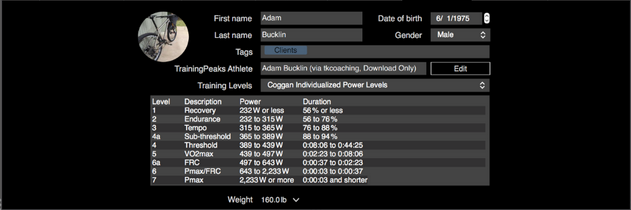
Here are Adam’s initial power profile test numbers and weight:
In a different view:

In my initial review meetings with Adam, I gathered his historical training history and power data and we were able to make a few base diagnoses.
1. Power to Weight
This one was clear. Adam needed to drop some weight to get back into competitive form. I wanted to motivate Adam to focus on this goal for two reasons. First, as already stated, we wanted to improve his power to weight ratio, and second, we wanted to improve his VO2Max performance that was limited (reduced) by the extra pounds.
Here’s the power-to-weight ratio chart I showed Adam in WKO4. The ability to see the gains laid out in clear fashion was instant motivation!

2. Power
Adam had power. I could see immediately that this guy could go hard! At the same time, I used the Power Duration Curve to identify some issues. Adam was a classic steady-state TTer who rode like a sprinter or trackie. I see this in athletes a lot, usually when riders do too many group rides or HIIT training, but the simple fact is that Adam really liked to go hard. Hard up hills, hard in a group, hard in training, hard in recovery.
The breakthrough happened when we spent some time reviewing his phenotype and power duration curve shape. He could clearly see his strengths (and limiters) and realize he needed to train and perform differently to maximize his natural ability.
3. Training History
Adam never rested. He learned this bad habit from his coach more than fifteen years ago and had started training again under the same old system. He needed to learn instead to train with a much better focus on training hard and resting hard.
Adam had good numbers, but we really see his strengths when he gets into the range of five minutes and above. His aerobic engine was strong, but he needed to develop in two areas.
- His limiter was the shorter items. He was clearly not a sprinter, but as a rider with goals in MTB success, he could build on his strong five-minute power. He just needed more “pop” in the range of thirty seconds to three minutes. We needed to build his Functional Reserve Capacity (FRC).
- He has strong steady state power but the power duration curve and power profile view demonstrated a drop off over time (around forty minutes) that gave insight into the fact his previous training protocol might have built some power but was not improving his fatigue resistance.
The Prescription
Based on our diagnosis, we decided on a two-pronged attack.
1. Develop a Better Power to Weight Ratio
The core of Adam’s training goal was to establish a good base while losing 15 to 20 pounds and training an average of 12 hours a week. To accomplish this we needed to improve his fatigue resistance over forty-five minutes with a steady dose of sweet spot training (SST) and long tempo rides, mixed with the appropriate rest and recovery. He wanted to go harder, and this type of work initially felt like a step backward. Fortunately he turned out to be a fast responder, and within weeks his FTP was on the move. Interesting note here: the power duration curve knew it before I did. The movement was strong enough that I had some doubts, so we tested again. Sure enough, he’d made some nice gains in the first four weeks.
As his aerobic fitness built, he also lost weight quickly, dropping about 20 pounds in the first training cycle (overall he lost almost 50 pounds by spring). We tracked his weight loss and power outputs, and while this was an aggressive pace for weight loss, he was still training strong and improving power numbers, so we continue to push.
To focus on developing his fatigue resistance, we quickly built to an average of sixty to eighty minutes per SST session and stretched his tempo ability out past two hours. Again, he was a fast responder and was quickly able to reach these training levels.
2. Improve Funcitional Reserve Capacity
We also needed to focus on Adam’s weakness. Using the Power Duration Curve and the new WKO4 iLevels to determine time ranges and power output, we added two to three FRC days to each three-week cycle in the foundation-building period. Our goal was to build maximum power while increasing Adam’s FRC. This meant we targeted the Pmax/FRC training levels with long rest periods.
The Results
The results were amazing. As we trained into the spring, Adam improved in all areas while continuing to lose weight. After building his foundation and producing strong improvements, he decided to target not only the Oregon Series but also a strong placing at the 2015 Pro MTB Nationals.
The chart below shows Adam’s growth in the following areas:
Pmax
We had a lot of data issues, which made it hard to track Adam’s Pmax, but growth here was limited. The reality is that Adam will never be a sprinter.
Functional Reserve Capacity
Look at the strong growth here. The numbers were slightly affected by a few data spikes, but they are still reflective of his improvement from an early-season low of 8 kjs to 14 kjs by target event time.
Functional Threshold Power
The growth in Adam’s FTP was amazing. As he engaged in training and did the work, his FTP moved from 320 watts in November 2014 to peak at 414 watts at the time of MTB Nationals. He’d also slimmed down to around 165 pounds. Part of this rapid growth was because he had been off the bike for a long time before getting into the training program, but the end results went way beyond our targets.

Success
Adam had an amazing season. He won both the Oregon MTB Series and the State Championship. He peaked right at his target A race (the 2015 MTB Nationals), placing 17th at 41 years old. Not bad at all!
